Table of Contents
本文是之前汇总 Vue/微信小程序/快手小程序对比差异时候的学习笔记,发出来当个归档,不记得最初是啥时候写的了。
简单来说传递一部分 html 到子组件里,子组件可以根据特征选择如何展示内容。
- parent 传递 html
- child 接受 html 并展示
- 默认情况下插槽内容可以访问父组件数据
- 插槽内部数据,默认情况不能访问,但可以主动暴露,也就是作用域插槽
parent vue
<view>
  <child >
  <template #header>
  slot html
  </template>
  </child>
</view>
child vue
<view>
  <slot name='header'></slot>
</view>
作用域插槽 scoped-slots 在线演示
more
插槽内可以运算得到数据,可以传递给引用组件
child 内部的数据,通过 props 传递给父组件
<div>
  <slot :text="greetingMessage" :count="1"></slot>
</div>
parent 可以得到数据,再访问,方便组织结构,类似渲染函数传参
<MyComponent v-slot="slotProps">
  {{ slotProps.text }} {{ slotProps.count }}
</MyComponent>
配合 named-scoped-slots 实现,当然,也可以解构获取 headerProps
<MyComponent>
  <template #header="headerProps">
    {{ headerProps }}
  </template>
</MyComponent>
这里的 slot <slot name='header' :str='str' />
场景:提供灵活性,子组件只负责渲染,渲染过程父组件控制
微信小程序的 slot
基础用户和 vue 相同
支持父元素 传递 props,子元素接受
默认情况下 一个组件只有一个 slot
多 slot 需要 js 的 options 里声明
multipleSlots:true样式隔离。默认 styleIsolation 隔离,也可以
和 vue 相似,默认开启多 slot
child
<view>
<slot name='before' />
</view>
parent
<my-component>
 <view slot='before'>内容</view>
</my-component>
默认情况,child 本身节点是存在的,可以自由设置样式,但也可能希望这一层节点消失,方便设置 flex 等,也就是虚拟节点 options.virtualHost=true
这里涉及到很多样式的问题
parent:
<my-virtual-host class="class-in-virtual-host" style="text-decoration: underline">
  <view>这段文本是居中、蓝色、无下划线的</view>
</my-virtual-host>

<style>
.class-in-virtual-host {
  display: block;
  color: red;
  text-align: center;
}
</style>
child:
<view class="class blue">
  <slot />
</view>
<view style="{{style}}">这段文本是居左、黑色、有下划线的</view>

<style>
.blue {
color: blue;
}
</style>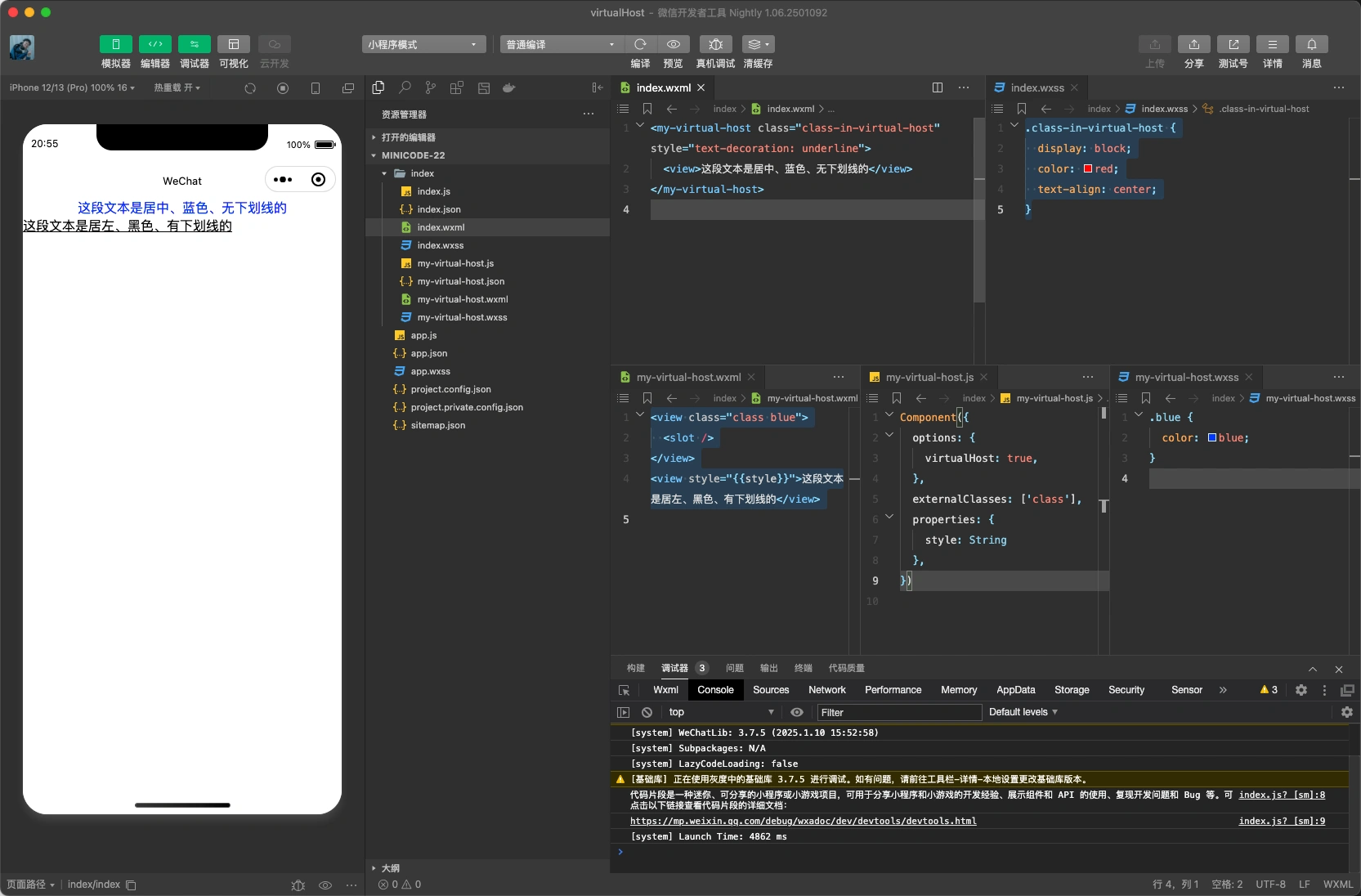
快手小程序的 slot
- 自定义组件
- 基础用法一样, slot 替换
- 默认情况一个组件只能有一个 slot ,类推 default
- 多 slot 时候需要定义不同的 name
Comments
Comments are disabled for now.